Day3: XDM, the Data Foundation That Quietly Controls Everything
There's a pattern you see on AEP projects that go wrong. The team is skilled, the budget is fine, the timeline is reasonable. Then months in, the profiles merge the wrong people, the segments pull the wrong audience, and the reports tell a story that isn't true. The cause is almost always the same. The schema design was wrong, and by the time anyone noticed, data had already been flowing into it for weeks.
Fixing a schema after ingestion has started is harder than starting clean, because every downstream product has already built on top of the broken shape. That is why XDM is the first thing worth checking on any engagement. Get it right and profiles, segments, journeys and analytics all get easier. Get it wrong and every product on top of AEP inherits the same crack.
This post covers what XDM is, how a schema is built, and the three mistakes that break real projects.
What XDM is
XDM stands for Experience Data Model. It is Adobe's standard schema language, the single grammar that all data must follow before AEP will accept and process it.
AEP has to make sense of data from your website, CRM, mobile app, call centre, point of sale, and many other systems. Each of those speaks a different format. XDM is the standard they all map to, so that once the data is inside AEP, every part of the platform reads it the same way. Every schema you create is an XDM schema. Every dataset is checked against one. Every field in the Real-Time Customer Profile started life in an XDM model.
If you come from AEM, you already know this habit. You define a Content Fragment Model before you author structured content, so the content has a known shape. XDM is the same instinct applied to customer data. You define the model first, then data fills it. That one analogy carries most of this post.
How a schema is built: four layers
A schema comes together in four layers. The first three are where the work happens. The fourth is what you get when the first three are right.
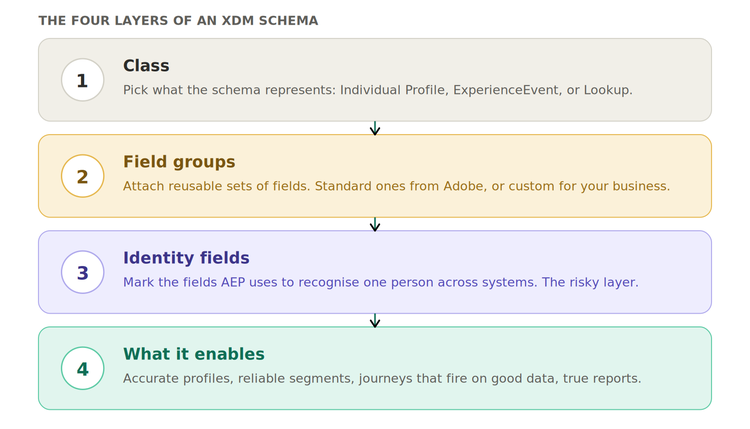
Layer 1: the class
Every schema starts by picking a class. The class sets what the schema represents at the highest level. Three classes cover almost every project.
Individual Profile represents who a person is. Static or slow-changing attributes live here: name, email, date of birth, loyalty tier, marketing preferences. Schemas using this class feed the Real-Time Customer Profile.
ExperienceEvent represents what a person did at a moment in time. Every record is time-stamped and never changes after it lands. Page views, purchases, app opens, email clicks, call centre contacts. This class captures behaviour, not identity.
Lookup represents reference data. Product catalogues, campaign metadata, B2B account records. It enriches events and profiles through relationships rather than feeding the profile directly.
Layer 2: field groups
Field groups are reusable sets of related fields you attach to a schema. Adobe ships a large library of standard ones, and you can build custom groups for your own attributes.
Common standard field groups include Personal Details (first name, last name, date of birth), Personal Contact Details (email, phone, address), Commerce Details (orders, cart, payment), and Web Details (page URL, referrer, browser).
The point of field groups is reuse. If your loyaltyTier field lives in a custom group called Loyalty Attributes, you can attach that one group to several schemas, and any update flows through consistently.
That beats redefining the same field in a dozen places. This is the same reuse logic behind shared field structures in a CF Model. Agree on a naming convention before the first schema is built, because renaming later is painful.
Layer 3: identity fields
This is the layer that causes the most trouble, so it earns the most care.
Identity fields are the fields AEP uses to recognise the same person across systems. When AEP sees the same value, an email, a CRM ID, a loyalty number, show up in different datasets, it uses those matches to stitch the records into one profile through the identity graph.
Common identity fields are ECID (the anonymous web or app identifier), email, CRM ID, phone number, and loyalty ID. Every schema needs exactly one primary identity, the field AEP treats as the master key for merging. Choose it deliberately, because changing it later means re-ingesting data.
Two rules to lock in:
Mark too few identity fields and AEP cannot stitch across systems. Someone who browses anonymously and then logs in shows up as two different people.
Mark too many, especially fields that are not unique, and you risk identity graph collapse. AEP merges profiles that share that value, even though they belong to different people.
Layer 4: what the schema enables
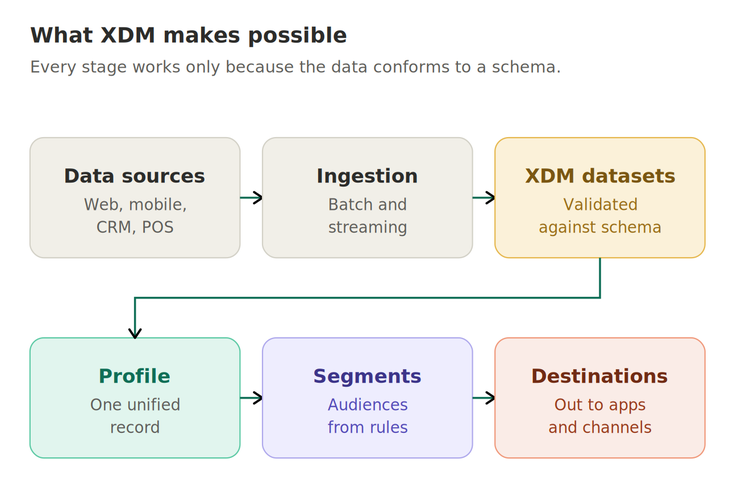
Get the first three right and the schema becomes the engine for everything else. A clean Individual Profile schema with good identity fields means the profile merges accurately. A clean ExperienceEvent schema with consistent timestamps means AJO journeys trigger on reliable signals and CJA reports show the true order of events.
The reverse compounds. A weak schema causes wrong merges, segments that include the wrong people, journeys that fire on bad data, and reports that mislead. Here is the full chain that a good schema makes possible.
The single most important split: profile vs event
If you take one thing from this post, take this. Profile data and event data are different kinds of data and must live in different schemas.
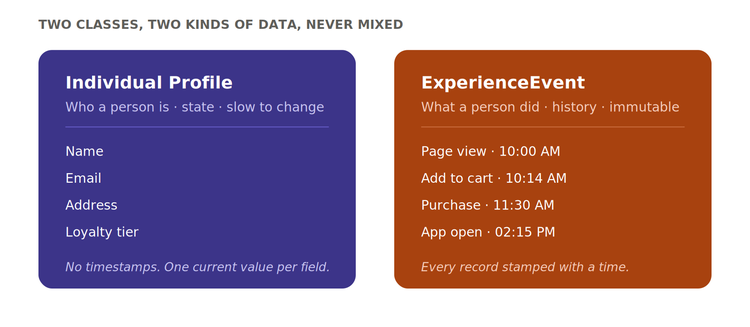
Event data is history. It is a stream of stamped moments showing what they did.
They merge differently, they are used differently, and putting events into a profile schema is the most common class mistake on real projects.
The three mistakes that break real projects
One schema for everything. Cramming every attribute the business cares about into one giant Individual Profile schema. It becomes impossible to govern, slow to change, and hard to document. Separate the concerns: profile attributes in Individual Profile schemas, behavior in ExperienceEvent schemas, reference data in Lookup schemas.
Marking too many identity fields. If you mark something like region or subscriptionPlan as an identity because its values look unique, AEP tries to stitch together every profile that shares that value. The result is one merged record that wrongly represents thousands of different people.
Mixing profile and event data in one schema. Putting time-stamped events into an Individual Profile schema. Profile data represents state, event data represents history, and they cannot merge the same way. Keep them apart.
The one principle to design by
Design your schema for how the data will be used downstream, not for how it arrives from the source.
Your CRM might export everything as one flat CSV. That does not mean it becomes one flat schema. Decide what belongs in the profile, what belongs in events, what should be an identity, and what should be reusable. Those choices, made at design time, set the quality ceiling for every output that follows.
What comes next
Episode 4 goes into identity resolution: how AEP takes scattered fragments about one person and stitches them into a single profile. That is where the identity graph and merge policies live, and it is where most teams spend their debugging time.